Action Mapper Modal
Overview
This section contains all components and utilities for Action Mapper Modal.
Components
| Item | Type | Description |
|---|---|---|
| Action Mapper | Class | Builder for configuring the Action Mapper modal. |
| System Utility Button | Class | Creates a new System Utilities action button. |
Action Mapper
Builder for configuring the Action Mapper modal.
The action mapper modal is the modal where the user can configure the behavior and map a channel/slider to an action.
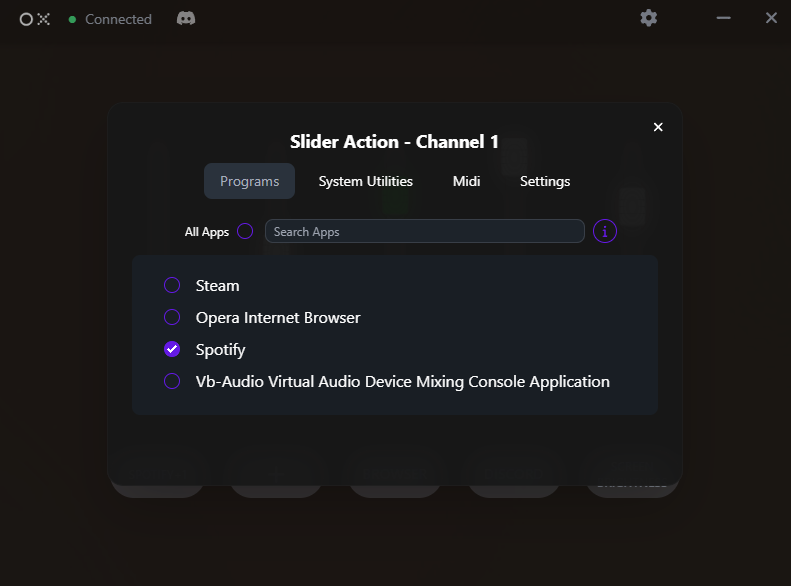
The action mapper can be accessed via the this.actionmapper property in the plugin class.
Example
// Create a simple action button
this.actionmapper
  .addSystemUtilButton('toggleMic')
  .setTitle('Mic Mute')
  .setIcon('fas fa-microphone fa-lg')
  .onClick(({ selected, channel }) => {
    console.log(`Mic ${selected ? 'muted' : 'unmuted'} on channel ${channel}`);
    // Call your MIDI/API to toggle mic
  });
Methods
| Method | Parameters | Description |
|---|---|---|
addSystemUtilButton() | id: string | Adds a system utility button to the action mapper.. |
addSystemUtilButton()
addSystemUtilButton(id: string): SystemUtilButtonHandleAdds a system utility button to the action mapper.
Parameters:
| Name | Type | Required | Description |
|---|---|---|---|
id | string | Yes | The id of the button |
Returns:
SystemUtilButtonHandle - The SystemUtilButtonHandle for method chaining
System Utility Button
Creates a new System Utilities action button.
System Utility buttons appear in the action selector modal and can be assigned to device channels. Each button maintains its own selected state per channel.
Example
// Basic action button
this.actionmapper
  .addSystemUtilButton('mute')
  .setTitle('Mute')
  .setIcon('fas fa-volume-mute fa-lg')
  .onClick(({ selected, channel }) => {
    console.log(`Channel ${channel} mute ${selected ? 'ON' : 'OFF'}`);
    // Implement mute logic
  });

// Button with settings
const volumeButton = this.actionmapper
  .addSystemUtilButton('volume')
  .setTitle('Volume Control')
  .setIcon('fas fa-volume-up fa-lg');

volumeButton.addSettings((settings) => {
  settings.addSection('volume').setName('Volume Settings');

  settings.addInput('maxVolume')
    .setType('number')
    .setLabel('Maximum Volume')
    .setValue(100)
    .setMin(0)
    .setMax(100);

  settings.addSwitch('smoothing')
    .setLabel('Volume Smoothing')
    .setValue(true)
    .setDesc('Smoothly transition between volume levels');
});
Methods
| Method | Parameters | Description |
|---|---|---|
addSettings() | build: (b: SettingsBuilder) => void | Used to add settings to a system utility button.. |
getSelectedMap() | - | Gets the selected state map for the system utility button.. |
isSelected() | channel: string | number | Checks if the button is selected on a specific channel.. |
onClick() | handler: (evt: any) => void | Sets the click handler of the system utility button.. |
setAutoPersist() | flag: boolean | Sets the auto persist flag for the system utility button.. |
setDisabled() | disabled: boolean | Sets the disabled state of the system utility button. |
setHidden() | hidden: boolean | Sets the hidden state of the system utility button. |
setIcon() | icon: string | Sets the icon of the system utility button.. |
setTitle() | title: string | Sets the title of the system utility button.. |
addSettings()
addSettings(build: (b: SettingsBuilder) => void): thisUsed to add settings to a system utility button.
See also:
- SettingsBuilder Components - For all available UI components
Parameters:
| Name | Type | Required | Description |
|---|---|---|---|
build | (b: SettingsBuilder) => void | Yes | The function to build the settings. |
Returns:
this - The SystemUtilButtonHandle for method chaining
Example:
- typescript
* this.actionmapper
*   .addSystemUtilButton('mute')
*   .setTitle('Mute')
*   .setIcon('fas fa-volume-mute fa-lg')
*   .onClick(({ selected, channel }) => {
*     console.log(`Channel ${channel} mute ${selected ? 'ON' : 'OFF'}`);
*     // Implement mute logic
*   })
*   .addSettings((settings) => {
*     settings.addSection('mute').setName('Mute Settings');
*     settings.addSwitch('mute').setLabel('Mute').setValue(true);
*   });
* ```
getSelectedMap()
getSelectedMap(): RecordGets the selected state map for the system utility button.
Returns:
Record - The selected state map for the system utility button
Example:
const selectedMap = this.actionmapper.addSystemUtilButton('mute').getSelectedMap();
console.log('Selected map:', selectedMap);
isSelected()
isSelected(channel: string \| number): booleanChecks if the button is selected on a specific channel.
Parameters:
| Name | Type | Required | Description |
|---|---|---|---|
channel | string \| number | Yes | The channel to check |
Returns:
boolean - True if the button is selected on the channel, false otherwise
onClick()
onClick(handler: (evt: any) => void): thisSets the click handler of the system utility button.
Parameters:
| Name | Type | Required | Description |
|---|---|---|---|
handler | (evt: any) => void | Yes | The click handler of the system utility button |
Returns:
this - The SystemUtilButtonHandle for method chaining
Example:
this.actionmapper.addSystemUtilButton('mute').onClick(({ selected, channel }) => {
  console.log(`Channel ${channel} mute ${selected ? 'ON' : 'OFF'}`);
  // Implement mute logic
});
setAutoPersist()
setAutoPersist(flag: boolean): thisSets the auto persist flag for the system utility button.
Parameters:
| Name | Type | Required | Description |
|---|---|---|---|
flag | boolean | Yes | The auto persist flag |
Returns:
this - The SystemUtilButtonHandle for method chaining
Example:
this.actionmapper.addSystemUtilButton('mute').setAutoPersist(true);setDisabled()
setDisabled(disabled: boolean): thisSets the disabled state of the system utility button. When disabled, the button appears but cannot be clicked.
Parameters:
| Name | Type | Required | Description |
|---|---|---|---|
disabled | boolean | Yes | Whether the button should be disabled |
Returns:
this - The SystemUtilButtonHandle for method chaining
Example:
const button = this.actionmapper.addSystemUtilButton('feature')
  .setTitle('Feature')
  .setDisabled(true); // Initially disabled

// Enable it when ready
button.setDisabled(false);
setHidden()
setHidden(hidden: boolean): thisSets the hidden state of the system utility button. When hidden, the button will not appear in the System Utilities selector.
Parameters:
| Name | Type | Required | Description |
|---|---|---|---|
hidden | boolean | Yes | Whether the button should be hidden |
Returns:
this - The SystemUtilButtonHandle for method chaining
Example:
const button = this.actionmapper.addSystemUtilButton('feature')
  .setTitle('Advanced Feature')
  .setHidden(true); // Initially hidden

// Show it later when conditions are met
button.setHidden(false);
setIcon()
setIcon(icon: string): thisSets the icon of the system utility button.
Parameters:
| Name | Type | Required | Description |
|---|---|---|---|
icon | string | Yes | The icon of the system utility button |
Returns:
this - The SystemUtilButtonHandle for method chaining
Example:
this.actionmapper.addSystemUtilButton('mute').setIcon('fas fa-volume-mute fa-lg');setTitle()
setTitle(title: string): thisSets the title of the system utility button.
Parameters:
| Name | Type | Required | Description |
|---|---|---|---|
title | string | Yes | The title of the system utility button |
Returns:
this - The SystemUtilButtonHandle for method chaining
Example:
this.actionmapper.addSystemUtilButton('mute').setTitle('Mute');